
 [Sponsored] The healthcare sector is rapidly evolving with technological advancements reshaping the way medical professionals approach patient care. Among the most groundbreaking innovations is Virtual Reality (VR), which is increasingly being utilized to improve medical training and even real-life procedures. Virtual Reality in healthcare encompasses a variety of applications, but two of the most promising areas are virtual surgery and patient simulation. These technologies are transforming how we train healthcare professionals, conduct procedures, and manage patient care.
YouTube’s Time-Based UX Problem for Live Sports
 I like to play beach volleyball here in the Toronto area. I also watch beach volleyball on YouTube, which includes a lot of live streams from the AVP league in the US. It’s a fun sport that I recommend to anyone looking for a new athletic competition to follow.
In most leagues and tournaments, beach volleyball games have a 3-set format, with each set finishing when a team reaches 21 points (or higher if they’re not yet ahead by 2). The third set (played if needed) will go up to 15 points (again, win by 2). Some leagues/tournaments will play all three sets up to 15. It depends on the venue, tournament, etc.
Don’t Let ChatGPT Write Your Code

We can all agree it’s ridiculous to suggest that we should ignore a modern tool that makes it exponentially easier to finish our work.
But as I’ve learned in 20+ years of writing code, there’s always going to be a drawback to using any tool that “makes life easier”. In this case, AI-based tools that use ChatGPT or some other AI-based foundation are similar to the frameworks we’ve been using for years.
CSS Rules vs. CSS Rulesets
 Over the last 10 years or so I’ve done a ton of technical editing work. I’ve helped with CSS articles and CSS books for various online and print publications. One of the things that comes up often when I make suggestions is the difference between a CSS rule and a CSS ruleset.
In most cases, almost all authors use the term “CSS rules” to refer to the blocks of CSS that include the selector and the CSS declarations. Is this correct?
Filestack: A File Uploader and Powerful APIs to Deliver and Transform App Content
 [Sponsored] If you’re building an app that requires a lot of user-generated content and media that needs to be processed, tagged, filtered, or otherwise manipulated in real-time, you definitely want a solution that’s fast and seamless and doesn’t get in the way of your app’s primary functionality. Filestack is a service you’ll want to consider. Here’s what Filestack offers:
How to Disable JavaScript in Almost Any Browser
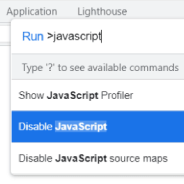 In 2022 I think it’s still important as a web developer to test your how your websites look and function when users disable JavaScript in their browser. Developing in this way used to be a cornerstone of Progressive Enhancement and can be handy on both desktop or mobile.
I still find myself wanting disabling JavaScript on pages I visit. Sometimes it’s to test a page I’m working on, but in other instances it’s simply to visit a web page that’s not functioning correctly and I want to see if JavaScript is the culprit.
A Review of ipwhois.io for Reliable Geolocation Data
 [Sponsored] If you’re building an app that requires delivering a dynamic experience based on the user’s location or other location-related data, a fast and easy-to-use Geolocation API will certainly come in handy. One such option is ipwhois.io. The service, which is free for small non-commercial projects that need fewer than 10,000 requests per month, is easy to integrate with your tech stack.
As usual, it’s always best to look at a few examples so you can see it in action. Their documentation is short and easy to follow, so I’ll demonstrate using the following example request:
Detecting Specific Text Input with HTML and CSS
 Recently I came across a CodePen demo by a developer/engineer named Jane that was Tweeted out by Šime Vidas. The demo has a neat collection of HTML and CSS tricks rolled into one that I thought was worth examining in detail.
The page displays a secret message based on specific text input. Ok, that’s no big deal, right? Well this is done using pure HTML and CSS – no JavaScript. I’ve seen stuff like this before, but I thought it would be cool to break down exactly how this works. There are a few notable things happening in the code so I’ll break down each of the parts.
Are These the Most Interesting Front-end Developer Tools for 2021?
 When I come to the end of any given year, it’s always interesting to look back through the click-through stats for my weekly newsletter Web Tools Weekly to see which tools got the most attention.
This year wasn’t all that different from previous years. I’ve learned that clicks happen for basically one of two reasons:
Fading in a Page on Load with CSS & JavaScript
 When I visit a page, I get annoyed when I try to interact with elements while the website is still loading. Often stuff is moving around, fonts aren’t quite loaded, and it feels broken.
I know nowadays we’re obsessed in this industry with gaining every millisecond in page performance. But in a couple of projects that I recently overhauled, I added a subtle and clean loading mechanism that I think makes the experience nicer, even if it does ultimately slightly delay the time that the user is able to start interacting with my page.


